
NimblyMail runs an automated DNS audit of your active sender domain on a daily schedule (and on demand) and surfaces the result on the NimblyMail → Deliverability page and the dashboard.
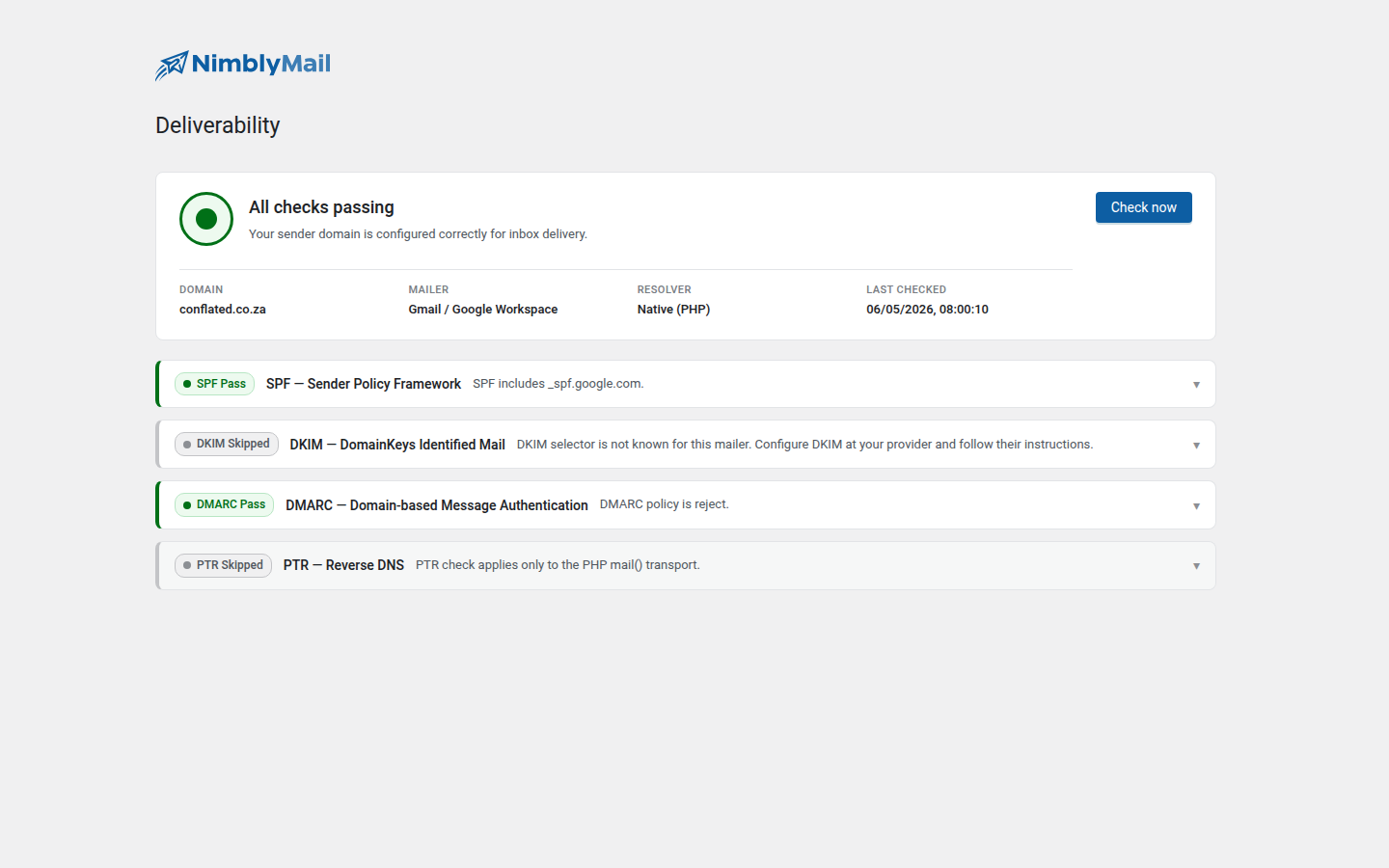
The audit is mailer-aware: required SPF includes and DKIM selectors are sourced from whichever provider you have configured (Gmail, Outlook 365, SES, Resend, etc.), with skip explanations for cases where a check does not apply.
What gets checked
Four pillars, in order of importance for inbox placement:
SPF — Sender Policy Framework
A TXT record on your sender domain that names the servers and services authorized to send mail for it. Inbox providers reject (or fold to spam) messages whose envelope sender doesn’t pass SPF.
Pass — your domain has an SPF record AND it includes the include token required by your active mailer (e.g. _spf.google.com for Gmail, spf.protection.outlook.com for Microsoft 365, amazonses.com for SES).
Warn / Fail — record missing, malformed, or doesn’t include the right token. The audit gives you the exact include:... token to add.
DKIM — DomainKeys Identified Mail
A cryptographic signature on every outgoing message, validated against a public key published as a TXT record at a provider-specific selector (e.g. default._domainkey.yourdomain.com).
Pass — DKIM key found at the expected selector.
Skipped — applicable for mailers that manage DKIM signing transparently for you (Gmail and Microsoft 365 sign with their own selectors when you send through their SMTP, so you don’t publish anything yourself for the basic case).
Fail — selector expected but missing.
DMARC — Domain-based Message Authentication
A TXT record at _dmarc.yourdomain.com that tells inbox providers what to do when a message claims to be from your domain but fails SPF or DKIM (none, quarantine, or reject).
Pass — DMARC record found and parsed.
Warn — present but uses p=none (monitor-only). For production transactional mail you want p=quarantine or p=reject once SPF/DKIM are stable.
Fail — no DMARC record at all.
PTR — Reverse DNS
A reverse DNS pointer for the IP your mail server sends from. Strict inbox providers (Gmail Postmaster, Microsoft) downrank or reject mail from IPs without matching PTR.
Pass — PTR exists and points to a hostname under a sane domain.
Skipped — applicable for mailers where your WordPress host’s outbound IP is irrelevant (every API-based provider — Gmail OAuth, SES API, Resend, SendLayer, Brevo, ZeptoMail, Outlook OAuth). You only see this check on Other SMTP and PHP mail().
Fail — no PTR set on your sending IP. Ask your host or VPS provider to set one.
Where the audit runs
The audit is owned by NimblyMail\SMTP\Audit\Scheduler and triggered from three places:
- Daily cron — runs once a day at the time your site’s WP-Cron fires.
- Manual refresh — click Check now on the Deliverability page.
- After mailer change — switching your active mailer auto-invalidates the previous result.
DNS lookups are made via PHP’s dns_get_record() first; on hosts that disable that function or block outbound DNS, NimblyMail falls back to public DNS-over-HTTPS resolvers (cloudflare-dns.com and dns.google) so the audit still completes.
Where the result shows up
- NimblyMail → Deliverability — the dedicated page with one card per pillar, the underlying record values, and a Check now button.
- Dashboard — a “Deliverability” widget summarises pass/warn/fail with a link to the full page.
- Failure alerts — when a pillar regresses from pass to fail, NimblyMail dispatches a failure alert (using the same channel as delivery alerts) so you find out before customers do.
Fixing common findings
SPF: missing include:_spf.google.com — your DNS TXT record needs to look something like:
"v=spf1 include:_spf.google.com ~all"If you already have an SPF record for another sender, merge the includes — only one SPF record per domain is allowed:
"v=spf1 include:_spf.google.com include:amazonses.com ~all"DMARC: missing — start with a monitor-only policy:
_dmarc.yourdomain.com TXT "v=DMARC1; p=none; rua=mailto:[email protected]"Once you’ve reviewed the aggregate reports (the rua mailbox) and confirmed legitimate mail is passing, tighten to p=quarantine then p=reject.
PTR: missing on your VPS — log into your hosting control panel (Hetzner, DigitalOcean, AWS, etc.) and set the reverse DNS record for the outbound IP to a hostname like mail.yourdomain.com. If the host requires you to add a forward A record matching the PTR, do that first.
Disabling the audit
You currently can’t fully disable the audit, but the daily cron is best-effort and self-throttles. If you don’t want the dashboard widget, hide it from Screen Options on the dashboard.
Privacy
The audit performs DNS lookups for the sender domain only. The sender domain (and DKIM selector when applicable) is the only piece of information that leaves your host. No mail content, no recipient list, no NimblyMail telemetry.