
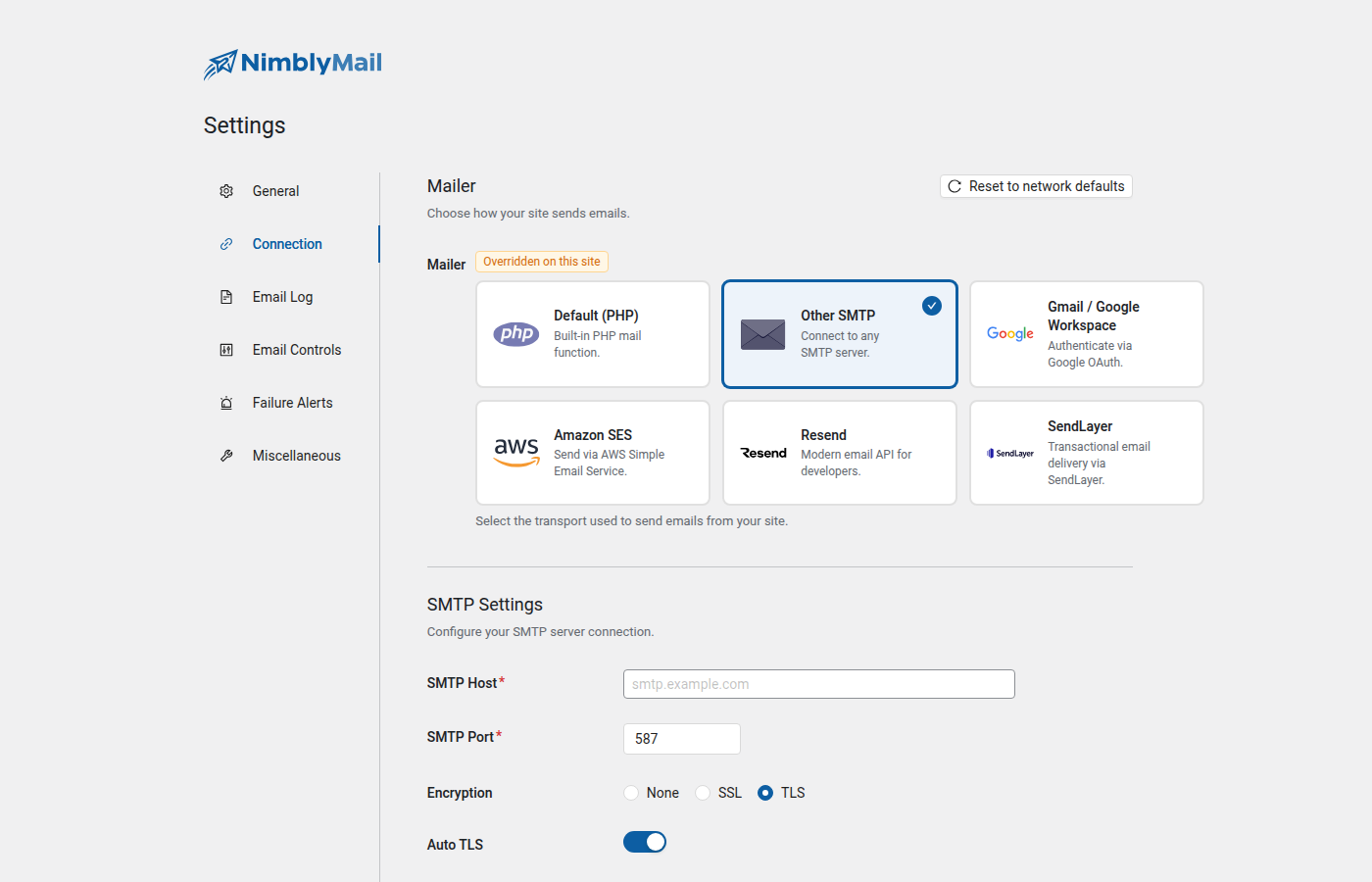
Other SMTP lets you send email through any standard SMTP server using a host address, port, and credentials. Use this option when your hosting provider or email service gives you SMTP details, or when you want to relay email through an existing mail account.
Prerequisites
You need SMTP credentials from your email provider. These are typically:
- An SMTP hostname (e.g.,
smtp.gmail.com) - A port number (587, 465, or 25)
- An encryption type (TLS or SSL)
- A username (usually your full email address)
- A password (your account password or an app-specific password)
Check your email provider’s documentation or hosting control panel if you are unsure of these values.
Setup
Navigate to WP Admin > NimblyMail > Settings > Connection > Other SMTP.
Step 1 — Select the mailer
In the Mailer section, select Other SMTP.
Step 2 — Enter the SMTP host
In the SMTP Host field enter your provider’s outgoing mail server address. For example: smtp.gmail.com or smtp.office365.com. Do not include a port number here.
Step 3 — Set the port
In the SMTP Port field enter the correct port for your provider:
587— use with TLS (most common)465— use with SSL25— use with no encryption (not recommended; blocked by many hosts)
Step 4 — Choose encryption
Set Encryption to TLS unless your provider specifically requires SSL. TLS on port 587 is the current recommended standard. See the field reference for all options.
Step 5 — Enable authentication
Turn on Authentication. Virtually all modern SMTP servers require a username and password. Disabling this is only appropriate for local or development SMTP servers that accept unauthenticated relay.
Step 6 — Enter credentials
Enter your email address or account username in Username and the corresponding password in Password. Both values are stored encrypted.
Tip: If you are using Gmail with a standard Google account, you must use an App Password rather than your main account password. Google requires this when two-factor authentication is enabled. Generate one at myaccount.google.com/apppasswords. For Gmail via OAuth, see the Gmail provider page instead.
Step 7 — Save and test
Click Save Settings, then navigate to WP Admin > NimblyMail > Tools > Email Tester and send a test email to confirm delivery.
Field Reference
| Field | Description | Default |
|---|---|---|
| SMTP Host | Outgoing mail server hostname. Do not include port or protocol. | — |
| SMTP Port | Port number. Common values: 587 (TLS), 465 (SSL), 25 (none). | 587 |
| Encryption | Transport encryption. Options: None, SSL, TLS. TLS is recommended. | TLS |
| Auto TLS | When enabled, NimblyMail upgrades the connection to TLS automatically if the server supports it. Disable only if your server does not support TLS. | Enabled |
| Authentication | Enables SMTP AUTH (login with username and password). Required by most servers. | Enabled |
| Username | Your SMTP username, usually your full email address. Stored encrypted. | — |
| Password | Your SMTP password or app-specific password. Stored encrypted. | — |
Common SMTP Settings
| Provider | SMTP Host | Port | Encryption |
|---|---|---|---|
| Gmail (app password) | smtp.gmail.com |
587 | TLS |
| Google Workspace | smtp.gmail.com |
587 | TLS |
| Outlook / Office 365 | smtp.office365.com |
587 | TLS |
| Yahoo Mail | smtp.mail.yahoo.com |
465 | SSL |
| Mailgun | smtp.mailgun.org |
587 | TLS |
| SendGrid | smtp.sendgrid.net |
587 | TLS |
Tip: If your hosting provider offers SMTP relay (common on cPanel hosts), look for the Mail section in your control panel. The host is often your own domain (e.g.,
mail.yourdomain.com) and the username is the full email address of the account.
Troubleshooting
Connection refused
The host or port is wrong, or your server’s firewall is blocking outbound SMTP. Contact your hosting provider and confirm that outbound connections on port 587 or 465 are allowed. Some hosts block port 25 by default — use 587 instead.
Authentication failed
Double-check your username and password. For Gmail, ensure you are using an App Password rather than your main account password. For other providers, confirm that SMTP access is enabled on the account — some require it to be explicitly turned on in the account settings.
TLS / SSL handshake error
Try switching between TLS and SSL, or change the port to match. If you are on a server with an outdated PHP version, the OpenSSL extension may not support modern TLS certificates. Contact your host if you cannot resolve this.
Emails sent but landing in spam
SMTP authentication alone is not sufficient if your domain lacks SPF and DKIM records. Add the appropriate DNS records for your sending domain. Your email provider’s documentation will list the required records.
Constants (wp-config.php)
You can define SMTP settings as constants in wp-config.php instead of storing them in the database. Constants take precedence over any values saved in the settings screen.
define( 'NIMBLY_MAIL_SMTP_HOST',       'smtp.example.com' );
define( 'NIMBLY_MAIL_SMTP_PORT',       587 );
define( 'NIMBLY_MAIL_SMTP_ENCRYPTION', 'tls' ); // 'tls', 'ssl', or ''
define( 'NIMBLY_MAIL_SMTP_AUTH',       true );
define( 'NIMBLY_MAIL_SMTP_USER',       '[email protected]' );
define( 'NIMBLY_MAIL_SMTP_PASS',       'your-password' );
Tip: Defining credentials as constants is recommended on staging and production environments where you manage
wp-config.phpoutside of the database (e.g., via environment variables or a deployment pipeline). It prevents credentials from being overwritten by a settings import or plugin reset.