
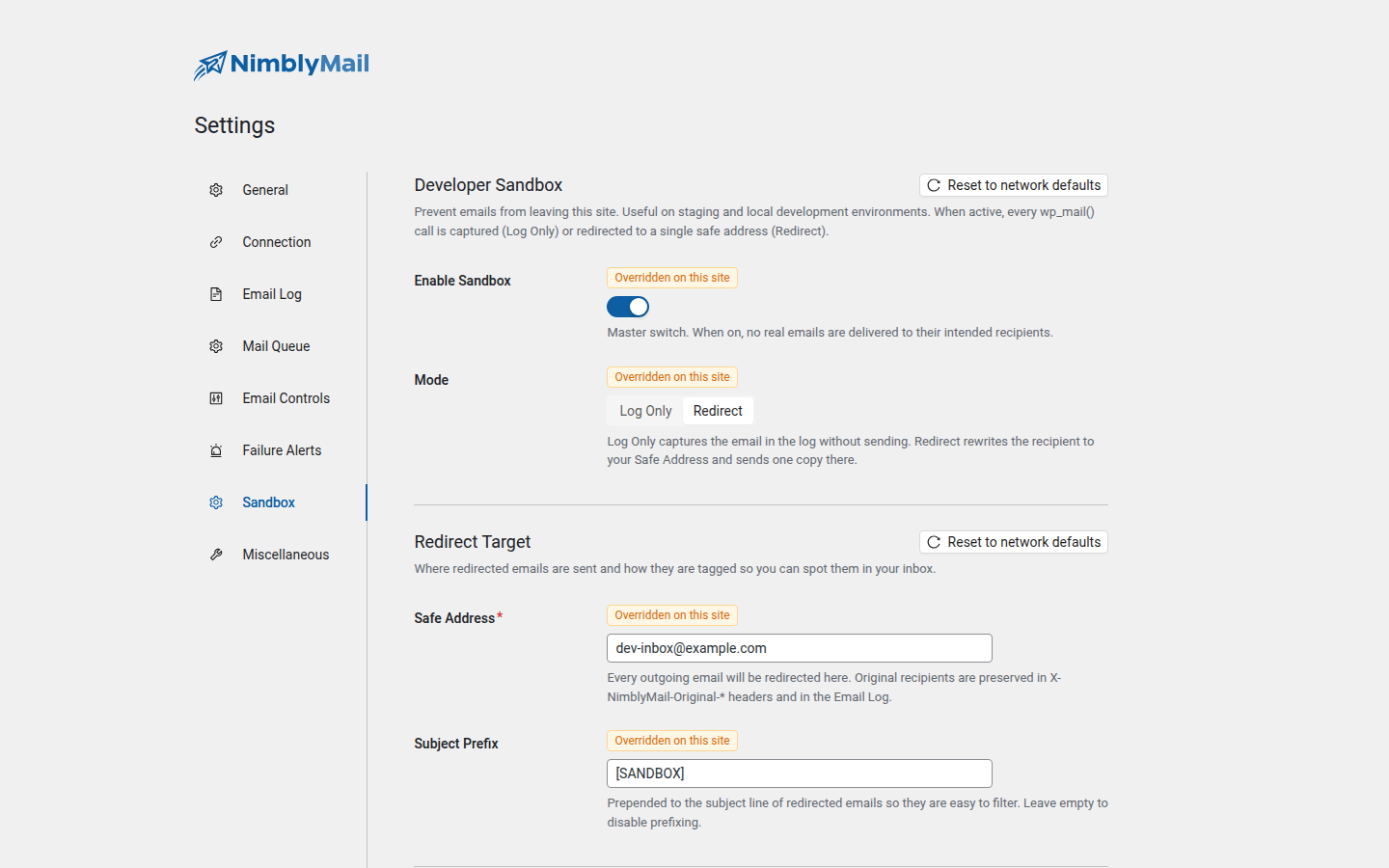
The Developer Sandbox stops staging copies and local clones from accidentally sending real customer email. Turn it on, pick a mode, and you have a guarantee that no recipient outside your allowlist will receive anything.
When to use it
- You restored a production database to a staging or local site and don’t want every queued WooCommerce order email to fire at customers.
- You’re building a new feature that triggers
wp_mail()and want to inspect the output without delivering it. - You’re QA-testing a third-party plugin’s email behavior.
- Your CI pipeline spins up an ephemeral WordPress instance and you want a hard guarantee against outbound mail.
Modes
Log Only
Every wp_mail() call is captured in the Email Log with status = sandboxed and a sandbox_mode = log flag. The send is then short-circuited at WordPress’ pre_wp_mail filter — no SMTP connection, no API call, nothing leaves the host. You can inspect the captured email body, headers, and recipients exactly as the calling plugin produced them.
Good for: full guarantee against any outbound mail.
Redirect
Every wp_mail() call is rewritten before delivery:
Tois replaced with the configured Safe Address.- CC and BCC are stripped.
- The original
To, CC, BCC are preserved inX-NimblyMail-Original-To,X-NimblyMail-Original-Cc,X-NimblyMail-Original-Bccheaders so you can see who would have received the message. - The configured Subject Prefix (default
[SANDBOX]) is prepended so redirected mail is easy to filter in your inbox. - An
X-NimblyMail-Sandbox: redirectheader marks every redirected email.
Good for: testing actual email rendering / deliverability against your own inbox without spamming customers.
Allowlist
Some addresses you do want delivered for testing (your own email, the QA team’s mailbox). Add them to the Allowlist patterns box, one per line:
# Exact email
[email protected]

# Domain wildcard — any address at allowed.example.
*@allowed.example- Lines starting with
#are comments. - Plus-aliases are normalized: an allowlist entry of
[email protected]matches[email protected](and vice versa). - Internationalized domain names (IDN) are normalized to ASCII (UTS#46) so
bücher.dematchesxn--bcher-kva.de. - If any address in the To field matches the allowlist, the entire
wp_mail()call passes through unchanged. CC / BCC are not consulted for the allowlist match.
Settings
| Field | Description |
|---|---|
| Enable Sandbox | Master switch. When on, no real customer email leaves the host (subject to the allowlist). |
| Mode | Log Only or Redirect. |
| Safe Address (Redirect mode) | The address every email is rewritten to. Required in Redirect mode. |
| Subject Prefix (Redirect mode) | Prepended to the subject of every redirected email. Default [SANDBOX]. |
| Allowlist | Newline-separated patterns. Empty = nothing is allowed through. |
The sandbox state is reflected on the WordPress admin bar via a coloured badge so you never forget it’s on.
Constants
You can lock the sandbox via PHP constants in wp-config.php — useful when provisioning a staging environment so the admin UI cannot accidentally turn it off:
define( 'NIMBLY_MAIL_SANDBOX_ENABLED',      true );
define( 'NIMBLY_MAIL_SANDBOX_MODE',         'redirect' );
define( 'NIMBLY_MAIL_SANDBOX_SAFE_ADDRESS', '[email protected]' );
define( 'NIMBLY_MAIL_SANDBOX_ALLOWLIST',    "[email protected]*@yourcompany.com" );
When a constant is defined, the corresponding field in the admin UI becomes read-only with a "Defined in wp-config.php" badge.
Interaction with the Mail Queue
When the sandbox is enabled, the mail queue is disabled at the source — wp_mail() calls do not enter the queue. Log-mode emails would never deliver (so queueing them is pointless), and redirect-mode emails are a single synchronous send to the safe address (so queueing adds latency for no benefit).
If you enable the sandbox after rows are already queued, the Runner permanently fails them rather than delivering — the admin’s intent ("do not send real email") wins over previously-pending work.
Interaction with the Email Log
Sandboxed emails are recorded with:
status = sandboxedsandbox_mode = logorredirectorbypassed(allowlist match or test-email override)- For redirect mode: the original recipients are preserved in the row’s headers field
The Email Log UI shows a Sandboxed badge on these rows.
Troubleshooting
An email reached a real customer despite the sandbox being on
Either the recipient matched the allowlist, or another plugin short-circuited pre_wp_mail before NimblyMail could run. NimblyMail hooks pre_wp_mail at PHP_INT_MIN and returns true unconditionally in log mode, so log mode wins regardless of registration order. If you’re in redirect mode and a sibling plugin returns its own short-circuit value, that plugin wins — investigate the third-party plugin’s pre_wp_mail handler.
Sandbox indicator missing from the admin bar
The badge is rendered by AdminAdminBar. If you’ve disabled the admin bar globally in WordPress, the indicator won’t show — check the Sandbox tab in settings to confirm the master switch state.
I want to bypass the sandbox for one specific call
Use SandboxInterceptor::set_bypass() immediately before wp_mail(). The flag is single-shot — it’s consumed by the next wp_mail filter call. NimblyMail uses this internally for the Tools > Email Tester so you can confirm a real provider works while the sandbox is on.