
Miscellaneous Settings
Navigation: WP Admin > NimblyMail > Settings > Misc
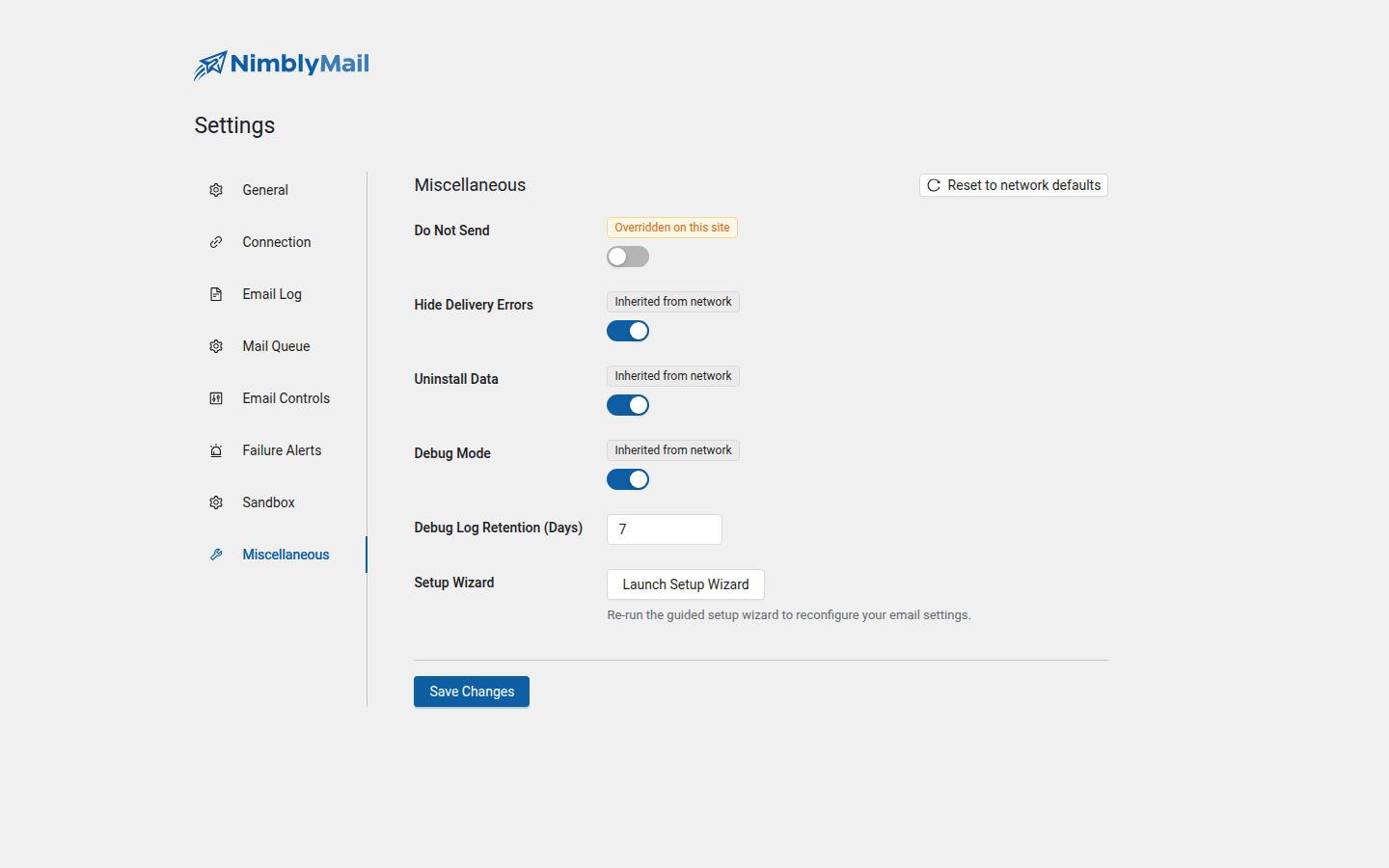
| Field | Description |
|---|---|
| Do Not Send | Prevents all emails from being sent. Emails are still logged normally. |
| Hide Delivery Errors | Suppresses WordPress email error notices in the admin area. |
| Remove Data on Uninstall | When enabled, deletes all NimblyMail data — settings, logs, and database tables — when the plugin is uninstalled. |
| Debug Mode | Enables SMTP debug logging. Captures the full SMTP protocol conversation for troubleshooting. Credentials are automatically redacted from debug output. |
| Debug Log Retention (Days) | How long to keep debug log entries before they are automatically deleted. Default is 7 days. |
| Launch Setup Wizard | Re-runs the guided setup wizard from the beginning. |
Enable Do Not Send on staging and development environments to prevent test emails from reaching real recipients while still allowing you to verify that mail is being generated and logged correctly.
Enable Debug Mode only when actively diagnosing a delivery problem. Debug logs can be verbose and will grow your database quickly on busy sites. Disable it again once you have collected the information you need.
Warning: Enabling Remove Data on Uninstall is irreversible. All log history and configuration will be permanently deleted when the plugin is removed. Leave this disabled if you want your settings and logs to survive a plugin deactivation/reactivation cycle.
Securing Settings with PHP Constants
Define constants in wp-config.php to lock NimblyMail settings. When a constant is defined, the corresponding field in the admin UI becomes read-only and displays a "Defined in wp-config.php" badge. The value stored in the database is ignored in favour of the constant.
This approach keeps credentials out of the database entirely, prevents settings from being changed via the UI, and is well-suited for managed hosting environments and team deployments where you want to enforce a specific configuration.
// Sender Identity
define( 'NIMBLY_MAIL_MAIL_FROM', '[email protected]' );
define( 'NIMBLY_MAIL_MAIL_FROM_FORCE', true );
define( 'NIMBLY_MAIL_MAIL_FROM_NAME', 'My Site' );
define( 'NIMBLY_MAIL_MAIL_FROM_NAME_FORCE', true );
define( 'NIMBLY_MAIL_MAILER', 'smtp' );
define( 'NIMBLY_MAIL_RETURN_PATH', true );

// SMTP
define( 'NIMBLY_MAIL_SMTP_HOST', 'smtp.example.com' );
define( 'NIMBLY_MAIL_SMTP_PORT', 587 );
define( 'NIMBLY_MAIL_SMTP_ENCRYPTION', 'tls' );
define( 'NIMBLY_MAIL_SMTP_AUTH', true );
define( 'NIMBLY_MAIL_SMTP_USER', '[email protected]' );
define( 'NIMBLY_MAIL_SMTP_PASS', 'password' );

// Gmail
define( 'NIMBLY_MAIL_GMAIL_CLIENT_ID', '...' );
define( 'NIMBLY_MAIL_GMAIL_CLIENT_SECRET', '...' );

// Amazon SES
define( 'NIMBLY_MAIL_SES_ACCESS_KEY_ID', 'AKIA...' );
define( 'NIMBLY_MAIL_SES_SECRET_ACCESS_KEY', '...' );
define( 'NIMBLY_MAIL_SES_REGION', 'us-east-1' );

// Resend
define( 'NIMBLY_MAIL_RESEND_API_KEY', 're_xxx' );

// SendLayer
define( 'NIMBLY_MAIL_SENDLAYER_API_KEY', 'sl_xxx' );

// Logging
define( 'NIMBLY_MAIL_LOGS_ENABLED', true );
define( 'NIMBLY_MAIL_LOGS_LOG_BODY', false );

// Alerts
define( 'NIMBLY_MAIL_ALERT_ENABLED', true );
define( 'NIMBLY_MAIL_ALERT_EMAIL_TO', '[email protected]' );

// General
define( 'NIMBLY_MAIL_DO_NOT_SEND', false );
define( 'NIMBLY_MAIL_DEBUG_MODE', false );
Tip: Place constants at the top of
wp-config.php, above the/* That's all, stop editing! */line. Never commitwp-config.phpto version control if it contains real credentials.
Credential Encryption
All sensitive fields — passwords and API keys — are encrypted at rest using AES-256-CBC with HMAC-SHA256 integrity verification. Encryption keys are derived from your WordPress AUTH_KEY and NONCE_KEY salts, which means the ciphertext is tied to your specific WordPress installation.
Encryption requires the OpenSSL PHP extension. If OpenSSL is not available or your WordPress salts are not properly configured, NimblyMail displays an admin notice and falls back to storing values unencrypted.
Warning: If you change your WordPress salts (for example, after a security incident), any credentials previously encrypted and stored in the database will no longer be decryptable. Re-enter your credentials in
WP Admin > NimblyMail > Settings > Connectionafter rotating salts.